
AI nutrition coaching helps you fix your day while you’re still eating it. Instead of waiting until 9:00 PM to see that you missed protein or went over calories, these apps read your food logs, goals, and activity after each entry and tell you what to do next.
Here’s the short version:
- I log food with a photo, chat, voice, barcode, or database search
- The app estimates calories, protein, carbs, and fat
- It compares that meal to my daily targets
- Then it gives a prompt like:
- add more protein
- keep dinner lighter
- choose a lower-carb option next
- Some apps also update calorie targets from Apple Health, Fitbit, Garmin, or other trackers
That timing matters. In one 90-day randomized controlled trial, the AI-coaching group lost 5.8 kg (12.8 lbs) versus 2.9 kg (6.4 lbs) for calorie tracking alone. Adherence was 81% vs. 36%. The big difference was not more data. It was feedback at the right time.
If I were picking an app, I’d focus on three things:
- How easy it is to log meals
- How fast it gives feedback
- Whether it helps with macros, habits, or nutrient detail
How AI coaching is changing the way people approach nutrition
Quick Comparison
| App | Best For | Main Style | Logging Effort |
|---|---|---|---|
| Welling | Fast meal logging and live feedback | Meal-by-meal calorie and macro coaching | Low |
| MyFitnessPal | Large food database | Context-based nutrition prompts | Medium |
| Cronometer | Nutrient detail | More detail on vitamins and minerals | Medium |
| Noom | Habit change | Psychology and check-ins | Medium |
| Lose It! | Simple calorie tracking | Light coaching | Low |
In this guide, I break down how these apps work, how to set one up, follow a calorie tracking guide, how to use prompts before and after meals, where AI gets things wrong, and which calorie tracking apps fit which type of user.
How AI Nutrition Coaching Works
Real-time coaching usually follows three steps: identify the meal, set the target, then suggest the next best move. Each part builds on the one before it.
Photo recognition, chat input, and food databases
When you snap a photo of your plate, the app’s computer vision model tries to identify the foods and estimate portion sizes. Photo logging tends to work best when you pair it with chat or voice input. That extra context helps the AI make better sense of mixed dishes and meals that don’t have clear labels.
Apps like Welling let you describe a meal in plain text — “grilled salmon with avocado salad and rice” — or speak it out loud. The AI then parses those words to identify ingredients and quantities with natural language processing (NLP). Welling cross-references that input with a food database to estimate calories and macros. MyFitnessPal and Lose It! rely more on database search and barcode scanning.
Once the app figures out what you ate, it can turn that meal log into calorie and macro numbers for the rest of the day.
How apps set your daily calorie and macro targets
During setup, the app asks for your age, sex, height, weight, and activity level. It uses that information to estimate your total daily energy expenditure (TDEE). From there, your goal drives the math. If you want weight loss, muscle gain, or maintenance, the app sets calorie and macronutrient targets for protein, carbs, and fats.
If you connect a fitness tracker or wearable, the app can adjust your calorie budget in real time based on activity and workouts.
Those targets act as the baseline for every prompt the app sends later.
How AI sends coaching prompts during the day
Once targets are in place, the app can coach you in real time. It flags imbalances as soon as you log a meal. If protein is low, it may suggest a higher-protein snack. If carbs or fats are running high, it may point you toward a lighter dinner.
Welling delivers this feedback within 30 seconds of logging. That cuts friction and helps you make better food choices during the day, instead of waiting until the day is already over. Noom takes a different angle. It focuses more on habits and food psychology, so it’s a better fit for behavior change than for meal-by-meal macro corrections.
How To Set Up Real-Time Coaching in an App
Start by setting up your profile with care. That one step shapes your targets and the prompts you get later. Using Welling as the example, here’s what that looks like.
Step 1: Build your profile and pick a goal
In Welling, you enter your age, sex, height, and weight. Then you choose a primary goal: weight loss, muscle gain, or maintenance.
Those details set your calorie and macro targets. If you choose muscle gain, the app increases calories and puts more focus on protein.
You can also turn on diet filters for:
- keto
- low-FODMAP
- halal
- allergy limits
Once your profile is done, switch on the tools that let the app coach you as you go.
Step 2: Turn on logging, notifications, and integrations
After you save your profile, enable notifications before you log your first meal. Then connect your wearable or fitness tracker so Welling can adjust your daily calorie target based on activity.
The app supports integrations with Apple Health, Fitbit, Garmin, and other fitness trackers.
To keep logging easy, use a counting calories app with photo, chat, or voice input. That cuts down friction. Welling also sends quick feedback soon after you log, which can help you adjust the rest of your day instead of waiting until nighttime to spot a problem.
After your first few logs, pause and review the estimates before you depend on them.
Step 3: Check your first few logs for accuracy
Look over your first entries closely, especially mixed dishes and restaurant meals. Those are often where apps get things wrong.
If an estimate is off, fix it in chat by adding missing ingredients or portions. A small correction here can make later prompts a lot more useful.
Aim for consistency, not perfection. Regular logs teach the AI more than perfect ones.
Once the app is dialed in, you can use those prompts to guide the rest of your day.
How To Use Real-Time Feedback To Change What You Eat
Once your app is set up, the main payoff happens during the day, not after it. The basic loop is simple: log your food, read the prompt, make one small change, and keep going.
Before meals: ask the AI what fits your remaining calories and protein/carb/fat targets
Before you order food or start cooking, ask the AI a direct question based on what you have left for the day. General questions usually lead to generic answers. A focused prompt like “I have 500 calories and 30g of protein left. What should I order?” tends to give you something you can use right away.
Welling is built for this kind of forward-looking prompt. You can also use it to reshape the rest of your day. Say breakfast leaned heavy on carbs. You can ask for a high-protein, lower-carb dinner that still fits your targets. Melissa Jaeger, Registered Dietitian and Head of Nutrition at MyFitnessPal, gives a similar example of asking for airport grab-and-go snacks or road-trip meal ideas.
That’s the point of the feedback: let it shape the next meal, not just comment on the last one.
After logging: use coaching to adjust the rest of your day
Right after you log a meal, the AI can spot what’s drifting. If breakfast used up a big chunk of your calories, it may steer you toward a lighter lunch or dinner. If your protein is low by midday, it can nudge you toward a higher-protein meal before that gap gets worse.
Use the prompt to decide what comes next, not only to review what already happened. Welling lets you ask, “How is my day looking?” and gives you a plain-English summary of what you have left and what to do next.
That only works well if your log is accurate.
Where AI coaching helps and where it falls short
AI can be useful for day-to-day accountability and fast course correction. But it has limits. Portion estimates can drift with complex restaurant meals or homemade dishes that don’t have labels, and one bad estimate can throw off every prompt that comes after it.
If you have a medical condition like diabetes or heart disease, AI suggestions should support clinical guidance, not stand in for it. And if an estimate looks wrong, fix it in the chat so the rest of the day’s coaching stays on track.
Use AI for quick daily adjustments. Use a clinician for medical care.
Different apps handle these prompts in different ways, and that can shape which one makes sense for you.
Choosing the Right AI Nutrition App
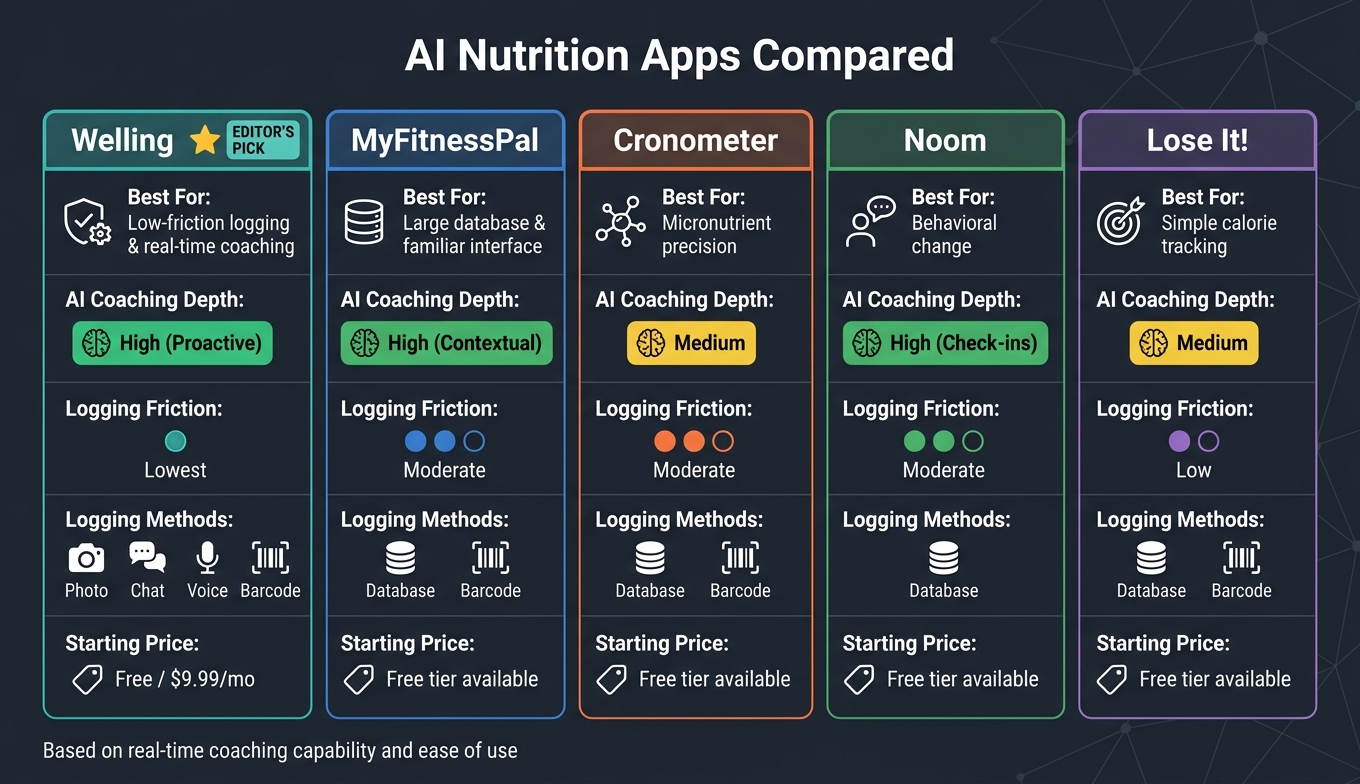
Welling vs MyFitnessPal vs Cronometer vs Noom vs Lose It!
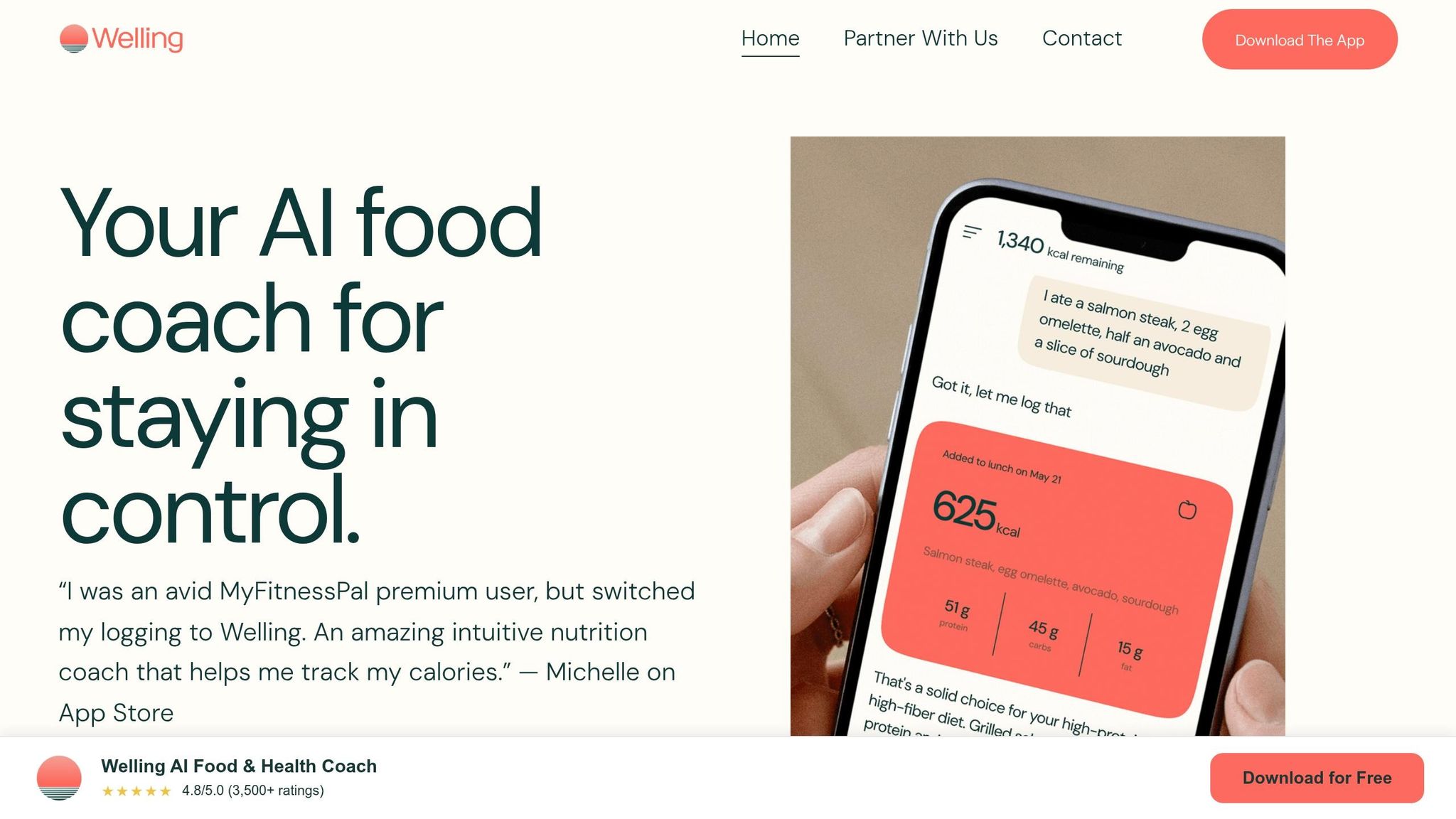
AI coaching isn’t the same across apps. Some tools are built for fast feedback. Others lean harder into nutrient detail or habit support. So the best pick comes down to one simple thing: how you like to log meals and how fast you want guidance.
Use the table below as a decision filter, not a giant feature checklist.
| App | Best For | AI Coaching Depth | Logging Friction |
|---|---|---|---|
| Welling | Low-friction logging and real-time coaching | High (proactive) | Lowest |
| MyFitnessPal | Large database and familiar interface | High (contextual) | Moderate |
| Cronometer | Micronutrient precision | Medium | Moderate |
| Noom | Behavioral change | High (check-ins) | Moderate |
| Lose It! | Simple, low-friction tracking | Medium | Low |
Here’s the short version.
Welling stands out if you want photo- and chat-based logging with immediate coaching. It’s built for people who want to move fast and get feedback in the moment.
MyFitnessPal makes sense if you want a large food database and a logging flow that already feels familiar. Cronometer is a better fit if micronutrient detail matters most. Noom leans more toward behavior coaching than meal-by-meal macro feedback. Lose It! works well for simple tracking with lighter coaching.
On price, Welling offers a free tier for basic logging, and Premium starts at $9.99/month. MyFitnessPal, Cronometer, Noom, and Lose It! also tend to offer free basic tiers, with paid features behind monthly or annual subscriptions.
Key points to keep in mind before you start
If two apps seem close, go with the one that makes logging feel easiest. That matters more than people think. The best coaching system falls apart if logging feels like a chore.
Pick the app you’ll actually open before each meal. That’s the one most likely to help.
Notifications can help too, but only if they push you to act before your next meal. If alerts just become wallpaper on your phone, turn them off.
FAQs
How accurate is AI meal logging?
AI meal logging can do more than count calories. It can be more accurate — and a lot more useful — when it pairs logging with real-time, personalized feedback.
Instead of just storing what you ate, these tools look at your logs and respond with context. That means guidance based on your habits, meal suggestions that shift with your goals, and small accountability nudges that help you stay on track.
Welling makes this simple with photo and chat-based logging. It also includes daily calorie guidance, macro tracking, and real-time coaching built around your goal.
Can AI nutrition coaching work for weight loss?
Yes. AI nutrition coaching apps can help with weight loss by pairing photo or chat-based food logging with your calorie and macro targets, then giving you real-time feedback on what to tweak next.
They can also look at patterns across several days and share weekly insights on nutrition trends, behavior barriers, and practical next steps. Welling, for example, offers real-time coaching and weekly summaries, and one RCT found higher 90-day adherence and greater weight loss.
What should I do if the app logs a meal wrong?
If the app logs a meal wrong, fix the entry. That gives the AI cleaner food data, so it can give better real-time feedback, adjust your targets, and suggest meal swaps that fit what you’re actually eating.
Apps like Welling make logging easier with photo- and chat-based tracking. They also provide personalized coaching based on your intake, activity, and goals.
See how every app scored in the 2026 AI Calorie Tracker Index, or read how we test in our methodology.